
83 Series Mass Flow Meter Startup Display and Photosensitive Touch Key Operation Instructions
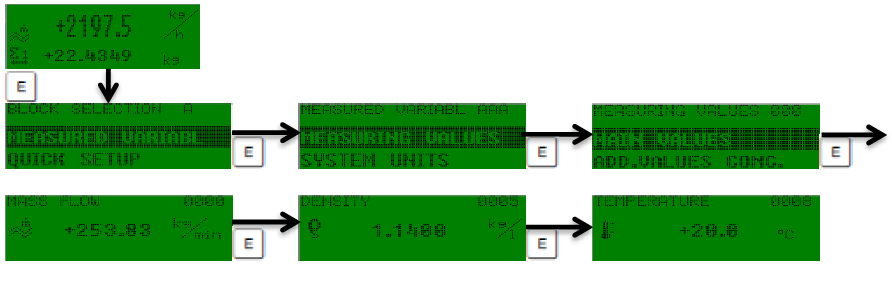
The 83 Series Mass Flow Meter adopts an advanced photosensitive touch key design, making operation intuitive and simple. After startup, the display screen will show measurement values, and users can perform function settings and data input through the touch keys.

Photosensitive Touch Key Function Detailed Explanation
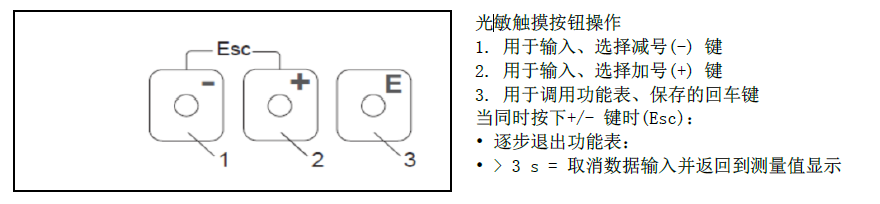
The photosensitive touch keys are the main operation interface of the 83 Series Mass Flow Meter, comprising three core keys, each with different functions.
- Minus Key (-): Used to input or select the minus sign, scroll down in menus, or decrease values.
- Plus Key (+): Used to input or select the plus sign, scroll up in menus, or increase values.
- Enter Key (Enter): Used to call up function menus or save current input. When the plus and minus keys are pressed simultaneously, the exit function (Esc) can be triggered.
Exit Function (Esc) Operation Instructions
Pressing the plus and minus keys simultaneously executes the exit operation, and the specific behavior depends on the press duration.
- Short press (press +/- keys simultaneously): Step-by-step exit from the current function menu, returning to the previous menu level.
- Long press for more than 3 seconds: Cancel the current data input and directly return to the measurement value display interface.
Operating Precautions
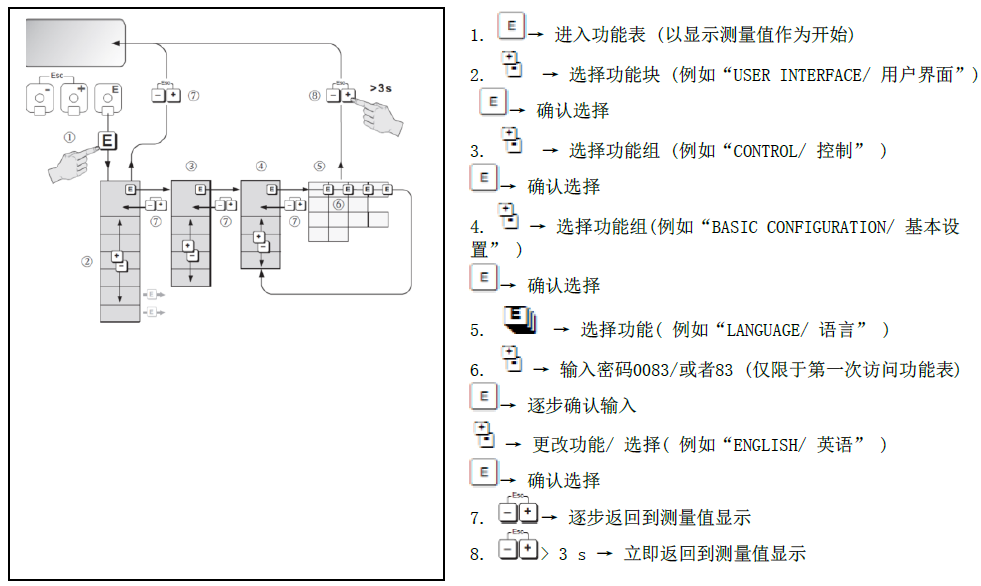
To ensure accurate operation, please note the following points:
- Touch the keys gently to avoid damaging the photosensitive elements with excessive force.
- When inputting data, if cancellation is needed, long press the +/- keys for more than 3 seconds to return to the measurement interface.
- During function menu operation, use the +/- keys for navigation and the enter key to confirm selections.
Key Function Quick Reference Table
| Key | Function | Operation Method |
|---|---|---|
| Minus Key (-) | Input/select minus sign, decrease values | Single touch |
| Plus Key (+) | Input/select plus sign, increase values | Single touch |
| Enter Key (Enter) | Call up function menu/save input | Single touch |
| Exit (Esc) | Step-by-step exit from function menu | Press +/- keys simultaneously |
| Cancel Input | Cancel data input and return to measurement value display | Press +/- keys simultaneously for >3 seconds |
Mastering the above operations enables efficient use of the 83 Series Mass Flow Meter. For further understanding of advanced functions, please refer to the complete user manual.